

Mixed‑signal validation often starts with more tools than necessary. An oscilloscope for analog signals, a logic analyzer for digital buses, and a separate signal generator just to get known inputs into the system. This reference workflow shows how the Analog Discovery Pro 2440 (ADP2440) combines those roles into a single mixed‑signal setup using WaveForms, Digilent’s free test and measurement software.
The example is built around loopback testing, a technique engineers routinely use to verify behavior early, isolate issues quickly, and establish confidence before moving farther into system integration.
Loopback Testing as a Mixed‑Signal Baseline
Loopback testing works because it removes unknowns. When the same device generates and measures a signal, failures become easier to identify. Cabling issues, configuration errors, and timing problems surface immediately instead of later in the development cycle.
This workflow uses loopback in two complementary ways:
- Analog loopback to examine filtering, amplitude, and phase response across frequency
- Digital loopback to generate and decode protocol traffic using the same digital I/O
Together, these approaches provide a reliable baseline for mixed‑signal debugging, teaching, and system bring‑up.
Hardware: Analog Discovery Pro 2440
The Analog Discovery Pro 2440 is a USB‑based mixed‑signal oscilloscope designed for professional lab and bench work without the overhead of traditional rack instruments.
Features used in this workflow include:
- Four analog input channels with 12‑bit resolution and 100 MHz bandwidth
- A built‑in 14‑bit arbitrary waveform generator
- Sixteen digital I/O channels supporting logic analysis and protocol decode
- 512 MB of deep memory that can be allocated between instruments
- Tight integration with the WaveForms software environment
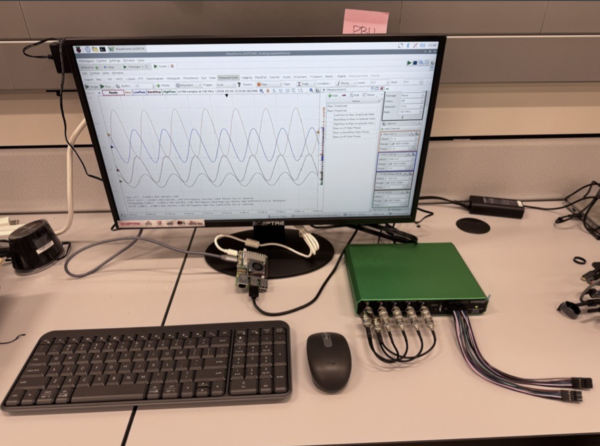
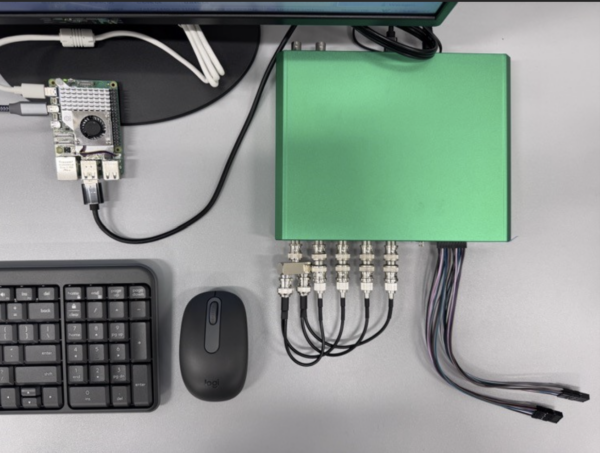
In this setup, the ADP2440 is controlled by a Raspberry Pi 5, showing that WaveForms runs reliably on a small single‑board computer. The hardware is DIN‑rail mounted to keep the system organized and accessible, making it suitable for lab benches, teaching environments, or semi‑permanent installations.
Analog Loopback: Comparing Filter Behavior in Real Time
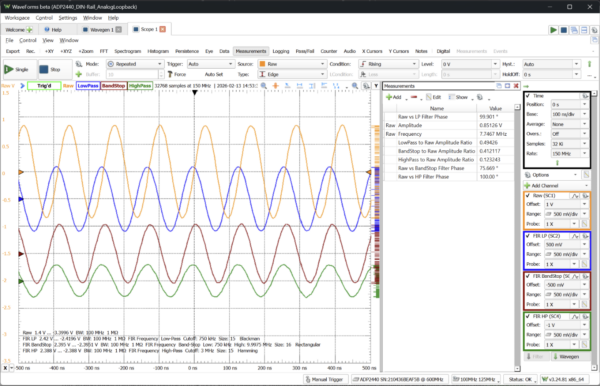
The analog portion of the workflow uses the ADP2440’s waveform generator to produce a swept sine wave. That signal is split and routed back into all four oscilloscope inputs.
Each input channel is configured to show a different view of the same signal:
- One channel displays the raw waveform
- Other channels apply hardware‑accelerated filters such as low‑pass, high‑pass, and band‑stop
Because the filtering is performed in hardware rather than software post‑processing, the filtered waveforms can be used directly for triggering and measurement. As the sweep progresses, changes in amplitude and phase are visible in real time, making it easy to compare how each filter behaves across frequency.
This approach is useful for validating signal‑conditioning paths, demonstrating filter theory with real hardware, or establishing expected behavior before adding firmware or external components.
Digital Loopback: Protocol Generation and Decode in One Device
The digital portion of the workflow highlights a less obvious capability of the ADP2440. The device can both generate and decode protocol traffic using its own digital I/O pins.
In this configuration:
- Twelve digital I/O lines are looped back on the front panel
- The WaveForms Script instrument cycles through UART, SPI, and I2C messages
- The Logic Analyzer captures and decodes each protocol frame as it appears
No external microcontroller or firmware is required. The Script instrument acts as a macro engine, issuing API calls that configure the Protocol and Logic instruments automatically. This allows users to exercise digital communications, observe timing, and verify decoding without writing code just to generate test traffic.
For debugging and teaching labs, this significantly shortens setup time and reduces complexity.
Repeatable Configuration in WaveForms
Both the analog and digital configurations are saved as WaveForms workspaces. Once the ADP2440 is powered and recognized, the workflow can be launched by opening a workspace and running all instruments together.
This makes the setup repeatable and consistent, whether it is being used for internal validation, classroom instruction, or customer demonstrations. Results are predictable, and the focus stays on measurement rather than configuration.
Digilent Products and Resources
- Analog Discovery Pro 2440: https://digilent.com/shop/adp2440/
- WaveForms Software: https://digilent.com/shop/software/waveforms/
- Analog Discovery Pro 2000 Series Resource Center:
https://digilent.com/reference/test-and-measurement/analog-discovery-pro-2000-series/start - Digilent Technical Forum: https://forum.digilent.com/
A Solid Starting Point for Mixed‑Signal Work
This workflow is not meant to showcase every feature of the Analog Discovery Pro 2440. Instead, it presents a known‑good mixed‑signal configuration that engineers can study, reproduce, and adapt to their own work.
By combining analog measurement, digital protocol analysis, and signal generation in a single device and software environment, the ADP2440 and WaveForms provide a straightforward way to approach mixed‑signal validation without unnecessary overhead.


