

An FPGA, or field-programmable gate array, is reconfigurable hardware that can perform many operations in parallel. A microcontroller unit (MCU) works differently. It runs software instructions on a processor, with memory and peripherals built into the same chip.
Inside an FPGA, you will find configurable logic blocks and programmable interconnects that you can use to build custom digital circuits with a hardware description language (HDL).
Asking which one is “better” misses the point because each device was designed for a different kind of job. Under the hood, however, the two share more than you might expect.
Multiplexers, flip-flops, lookup tables, and adders appear in both types of devices. These are some of the basic components integrated circuits use to turn input into meaningful output. Our guide to what an FPGA is explains these building blocks in more detail.
What separates the two devices is how those components are connected. In a microcontroller, the connections are fixed at the factory. With an FPGA, you configure much of the internal logic and routing yourself, and you can load a different configuration later.
Anyone who has worked with an application-specific integrated circuit (ASIC), system-on-chip (SoC), or central processing unit (CPU) will find some of these concepts familiar. If you have been working with Arduino and are wondering whether an FPGA should be your next step, we will cover that too.
Below, we compare FPGA and microcontroller architecture, speed, power consumption, programming, cost, and common applications. We will also look at when to use each device and which FPGA boards can make a good first step.
What Is the Difference Between an FPGA and a Microcontroller?
An FPGA is a chip containing configurable logic blocks, flip-flops, memory resources, and programmable routing. You use these resources to create custom digital hardware with an HDL such as Verilog or VHDL, which stands for VHSIC Hardware Description Language.
A microcontroller takes a software-based approach. It executes compiled instructions on one or more fixed processor cores, usually using firmware written in C, C++, or another supported language.
Put simply, an FPGA can implement many hardware operations that run concurrently. A microcontroller normally executes a stream of software instructions on each processor core, although peripherals, direct memory access (DMA), and multiple cores can handle some work concurrently.
What Is an FPGA?
An FPGA is an integrated circuit containing configurable digital logic resources, often organized into logic blocks. The connections between those resources can be configured by the user to implement a particular digital design.
Engineers describe the hardware they want, synthesize the design with a toolchain such as AMD Vivado, and load the resulting bitstream onto the FPGA. The same device can later be reconfigured for a different design without changing the physical chip.
What Is a Microcontroller?
A microcontroller is a small, self-contained computer implemented on a single integrated circuit. It typically combines a processor core, flash memory for program storage, RAM, and peripherals such as:
- Timers
- Analog-to-digital converters (ADCs)
- Universal asynchronous receiver-transmitters (UARTs)
- Serial Peripheral Interface (SPI) controllers
- Inter-Integrated Circuit (I2C) controllers
Unlike an FPGA, the internal connections and processor architecture of a microcontroller are fixed. You write firmware, compile it, and flash it to the device, much like installing software on a computer.
Common microcontroller families and architectures include AVR, Arm Cortex-M, PIC32, RP2040, and ESP32. The Arduino Uno R3, for example, uses an AVR microcontroller.
Microprocessors and microcontrollers are often confused, particularly in comparisons involving FPGAs. A traditional standalone microprocessor typically relies on external memory and peripherals. A microcontroller brings the processor, memory, and common peripherals together on one chip.
Many general-purpose FPGAs do not include a built-in hard processor core. SoC FPGAs are an important exception because they combine processor cores and programmable logic in the same device.
How Do FPGA and Microcontroller Architectures Differ?
A microcontroller runs software on one or more processor cores. Each core executes instructions in sequence, while built-in peripherals, interrupt controllers, and DMA engines may handle other operations in the background.
An FPGA works differently. You configure its logic and routing to create hardware circuits. Those circuits can run concurrently, allowing several functions to operate without waiting for a shared processor to execute their instructions one by one.
The difference becomes clearer in a block diagram. A typical microcontroller contains a processor, memory, and a fixed set of built-in peripherals. An FPGA contains programmable logic, memory resources, routing, clocking resources, and I/O blocks that you connect to implement the circuits your project requires.
Sequential Execution on a Microcontroller Core
On a single-core microcontroller, software tasks share the same processor. The fetch-decode-execute cycle can run very quickly, and interrupts allow urgent tasks to pause normal program execution.
Built-in peripherals can also handle some operations independently. However, when several software tasks need the processor at the same time, at least one task must wait. As the workload grows, keeping every task on schedule can become more difficult.
Parallel Hardware in FPGA Logic
Parallel processing is one of the primary strengths of an FPGA. With an HDL, you can describe separate circuits that perform different jobs at the same time.
If a design uses only a portion of the FPGA’s available resources, you may be able to instantiate several copies of the same module and process multiple inputs concurrently.
For example, suppose you create an HDL module that controls an LED based on a combination of switch inputs. You could place several copies of that module in the FPGA, with each copy monitoring a different group of inputs. As long as enough resources are available, the modules can operate simultaneously without taking turns on a shared processor.
FPGA vs Microcontroller Comparison
The following table summarizes the main differences to consider when choosing between an FPGA and a microcontroller.
| Factor | FPGA | Microcontroller |
|---|---|---|
| Architecture | Configurable logic blocks, memory resources, DSP slices, clocking resources, and programmable routing | Fixed processor core with on-chip flash, RAM, and peripherals |
| Execution model | Concurrent hardware circuits can run in parallel | Sequential instruction stream on each processor core, with peripherals and DMA providing additional concurrency |
| Programming method | HDL such as Verilog or VHDL; some workflows support C or C++ through high-level synthesis | C, C++, MicroPython, and other supported firmware languages |
| Toolchain | Simulation, synthesis, implementation, timing analysis, and bitstream generation | Compiler, linker, debugger, and flash programmer |
| Timing determinism | Highly predictable when the design meets its timing constraints | Can be affected by interrupts, operating systems, and task scheduling |
| I/O flexibility | Supports custom digital interfaces within device, board, pin, and I/O-bank limitations | Uses a fixed peripheral set and predefined pin-multiplexing options |
| Power consumption | Includes static and dynamic power; consumption depends heavily on the device, clock rates, and logic utilization | Often supports low-power and deep-sleep modes for intermittent workloads |
| Unit cost | Typically higher for comparable project volumes | Typically lower, especially in high-volume control applications |
| Development time | Often longer because of simulation, synthesis, implementation, and timing closure | Often shorter because firmware can be compiled and loaded quickly |
| Learning curve | Steeper for developers who are new to digital logic and hardware timing | More approachable for developers with software experience |
| Typical applications | DSP, video processing, software-defined radio, custom interfaces, high-speed data processing, and ASIC prototyping | Control systems, user interfaces, sensor reading, IoT devices, and battery-powered products |
The biggest difference is how the work gets done. A microcontroller relies primarily on software running on a processor. With an FPGA, you construct hardware circuits around the tasks the project needs to perform.
Is an FPGA Faster Than a Microcontroller?
Often, but not always.
For high-speed signal processing, video pipelines, or several operations that must run simultaneously, an FPGA can deliver low latency and high throughput because the work is implemented in dedicated hardware.
Clock speed alone does not answer the FPGA versus microcontroller speed question. A microcontroller may run its processor core at a higher clock frequency than an FPGA design, but the FPGA may accomplish more per clock cycle because many operations can occur concurrently.
Our article on why FPGAs work well for low-latency, time-critical processing explains where this advantage matters most.
For sequential or branch-heavy code, a fast microcontroller may complete the work efficiently and be much easier to develop for. A useful rule of thumb is to choose an FPGA when parallel execution, custom data paths, or deterministic timing matter more than development speed. Otherwise, a microcontroller is often the simpler choice.
Latency and Deterministic Timing
An FPGA can give a task its own hardware, so the task does not need to compete with unrelated software for processor time. Once the design meets its timing constraints, the movement of signals through the circuit can be controlled and analyzed down to individual clock cycles.
Microcontrollers can also provide precise timing. However, interrupt latency, higher-priority tasks, operating-system activity, and shared processor resources can introduce jitter.
A task may run predictably most of the time, then be delayed by an interrupt handler or another task. In a motor-control loop or high-speed protocol, even an occasional delay can create problems that are difficult to reproduce.
Throughput for Parallel Tasks
Throughput is where an FPGA can gain a major advantage.
Imagine that a system must filter data from several ADC channels, generate a VGA or HDMI pixel stream, and monitor user inputs. On a microcontroller, these jobs may compete for processor time, memory bandwidth, and peripheral resources.
With an FPGA, you can create separate processing paths so that data continues moving through each path concurrently. This does not mean every FPGA will outperform every microcontroller, but it can make a significant difference when multiple high-rate data streams need attention at the same time.
For the analog side of that example, see our guide to adding analog inputs to an FPGA.
How Does Power Consumption Compare?
For many battery-powered projects, a microcontroller is the better fit. Microcontrollers commonly provide low-power and deep-sleep modes, allowing a device that takes occasional sensor readings to spend most of its time consuming very little power.
An FPGA draws static power even when much of its logic is not switching. Its dynamic power consumption increases as more circuitry switches and operating frequencies rise.
The result can change for heavy, sustained parallel workloads. An FPGA may perform more work per watt by processing several tasks concurrently in dedicated hardware rather than executing them one at a time in software.
Power efficiency depends on the specific FPGA, microcontroller, clock configuration, I/O standards, workload, and duty cycle. For that reason, power consumption should be estimated with the appropriate design tools and measured on the target hardware instead of assumed.
For a closer look at architecture, performance, and power considerations, see our comparison of FPGA vs SoC trade-offs.
How Does FPGA Programming Differ From Microcontroller Programming?
On the microcontroller side, firmware is software. You write code, compile it, debug it, and upload it to the device.
FPGA development is different because you are describing digital hardware. A typical workflow includes:
- Writing Verilog, VHDL, or another supported design description.
- Simulating the design.
- Synthesizing the design into logic resources.
- Placing and routing those resources in the target FPGA.
- Checking timing constraints.
- Generating and loading a bitstream.
Because HDL describes circuits that operate concurrently, it reads differently from a sequence of software instructions. Learning to think about clocks, signals, state machines, resource use, and timing is often the biggest adjustment for developers coming from software.
If you have worked with C or C++, microcontroller programming will probably feel more familiar. You still need to understand registers, peripherals, interrupts, and timing, but you do not have to rethink the execution model in the same way.
High-level synthesis (HLS) tools can generate hardware descriptions from languages such as C and C++. HLS can help software-focused engineers begin working with FPGA acceleration, but developers still need to understand hardware architecture, interfaces, parallelism, and timing to produce an effective design.
For a closer comparison of the two major HDLs, see Verilog vs VHDL. You can also start with our FPGA glossary and setup guide.
When Should You Use a Microcontroller Instead of an FPGA?
Thermostats, robot controllers, data loggers, and IoT nodes are common microcontroller projects. Most of their work involves control logic, user interfaces, communication, or sensor readings at rates that a microcontroller can handle efficiently.
A microcontroller usually makes the most sense when:
- Battery life or low power consumption is a priority.
- You need to complete the project quickly.
- Unit cost is important, especially at higher production volumes.
- You want to use established libraries, forums, and example code.
- Your I/O requirements fit a standard set of peripherals such as UART, SPI, I2C, timers, PWM, and ADC inputs.
- The workload consists mainly of sequential control logic.
- The project does not require custom high-speed digital interfaces.
Using an FPGA for a basic control task can be like renting an excavator to dig a flower bed. The FPGA may be capable of doing the job, but a simpler and less expensive tool may finish it sooner.
Need help choosing hardware? See our guide to choosing a microcontroller board or our overview of microcontroller and parts starter kits.
When Should You Use an FPGA Instead of a Microcontroller?
An FPGA is well suited to designs that need parallel processing, deterministic timing, high-speed or custom digital interfaces, or control of many I/O signals at once.
Typical examples include:
- Digital signal processing pipelines
- Video and image processing
- Software-defined radio front ends
- High-speed data acquisition
- Custom communication interfaces
- Motor control with tight timing requirements
- Hardware acceleration
- Prototyping logic before developing an ASIC
A fast microcontroller may handle one time-critical task without difficulty. As more time-critical tasks are added, keeping all of them on schedule can become harder. An FPGA can assign separate hardware resources to those tasks so that they do not compete for processor time.
Another reason to choose an FPGA is hardware reconfigurability. Loading a new bitstream can change the implemented digital hardware after deployment. A new configuration may add or modify interfaces if the FPGA, board connections, and available resources support them.
A firmware update can change what a microcontroller does, but it cannot change the processor architecture or physically add peripherals that the chip does not contain.
An FPGA is worth considering when:
- Timing must be deterministic from one clock cycle to the next.
- You need a high-speed or non-standard digital interface.
- You need to manage many I/O signals simultaneously.
- Multiple data streams must be processed in parallel.
- Video, image processing, or DSP workloads benefit from dedicated hardware.
- You need to prototype custom logic before moving to an ASIC.
- A fixed microcontroller peripheral set does not meet the design requirements.
The trade-off is a steeper learning curve. FPGA development introduces HDLs, digital logic design, simulation, clock-domain considerations, timing constraints, and additional implementation variables.
If an ASIC is also under consideration, see our article on reasons to consider an FPGA over an ASIC or processor.
You can also browse Digilent FPGA boards or read Which FPGA Is Best for You? to narrow down your options.
Can an FPGA and a Microcontroller Work Together?
Yes. In many projects, using both is the most effective approach.
A microcontroller can handle communication, user interfaces, configuration, and general system control. The FPGA can handle processing that must occur concurrently, at high data rates, or with precise timing.
You do not always need two physical chips to divide the work this way. A soft-core processor such as AMD MicroBlaze can be implemented in FPGA logic. It provides CPU-style sequential execution alongside custom parallel hardware on the same FPGA.
A SoC FPGA goes further by including hard processor cores and programmable logic in a single package. AMD Zynq-7000 devices, for example, combine Arm Cortex-A9 processor cores with programmable logic.
The Zybo Z7 is based on this architecture, allowing developers to run software, including embedded Linux configurations, on the processor system while implementing custom hardware in the programmable logic.
For more information, see FPGA vs SoC. If you are interested in a soft-core processor, our walkthrough explains how to put a microprocessor on an FPGA.
Should Beginners Learn FPGA or Arduino First?
If you are completely new to embedded systems, starting with Arduino or another microcontroller development board usually makes sense. C-style programming, immediate feedback, and extensive libraries can make early projects easier to complete.
Move to an FPGA when you want to learn digital logic design, HDL, and how hardware circuits operate concurrently. Electrical and computer engineering courses often cover both, introducing FPGAs in digital logic and computer architecture labs.
If you have already used a microcontroller to blink LEDs, read sensors, or control a motor, an FPGA offers a new way to explore those concepts while learning how the hardware itself works.
For a first FPGA board, consider a trainer board with built-in switches, LEDs, pushbuttons, and 7-segment displays. These components let you observe a design without connecting substantial external hardware.
Our FPGA beginner glossary and setup guide can help you get started.
Which FPGA Board Should You Choose After a Microcontroller?
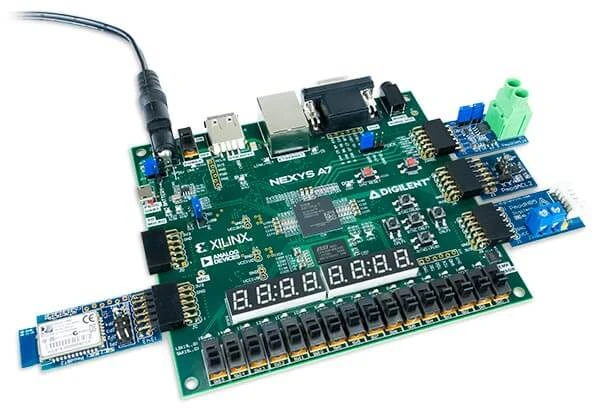
The Basys 3, Nexys A7, and Arty A7-100T offer different starting points for learning FPGA development.
The Basys 3 focuses on introductory digital logic. The Nexys A7 adds more memory, connectivity, and built-in peripherals for larger projects. The Arty A7-100T includes an Arduino/chipKIT shield connector, which may appeal to makers moving from an Arduino environment.
All three boards use AMD Artix 7 FPGAs.
Basys 3
The Basys 3 is built around an AMD Artix 7 XC7A35T-1CPG236C FPGA. It provides:
- 33,280 logic cells
- 90 DSP slices
- 1,800 Kbits of block RAM
- 16 switches
- 16 LEDs
- 5 pushbuttons
- A 4-digit 7-segment display
- Three standard Pmod ports
- One dual-purpose XADC and standard Pmod port
- A USB-UART bridge
- 12-bit VGA output
The built-in switches, LEDs, pushbuttons, and display are especially useful for introductory digital logic projects. You can test many basic designs without connecting additional hardware.
Nexys A7
The Nexys A7-100T uses an XC7A100T-1CSG324C FPGA. Its listed resources and board features include:
- 15,850 logic slices
- 240 DSP slices
- 4,860 Kbits of block RAM
- 128 MiB of DDR2 memory
- An onboard temperature sensor
- A microphone
- An accelerometer
- 10/100 Ethernet
- USB HID host support
- Four standard Pmod connectors
- A dedicated XADC connector
It can be a good next step when a project requires more FPGA resources, memory, connectivity, or built-in sensors than the Basys 3 provides.
Arty A7-100T
The Arty A7-100T is particularly relevant to makers moving from Arduino development. Its listed features include:
- An XC7A100TCSG324-1 FPGA
- 101,440 logic cells
- 240 DSP slices
- 4,860 Kbits of block memory
- 256 MB of DDR3L memory
- 10/100 Ethernet
- Four Pmod connectors
- An XADC input
- An Arduino/chipKIT shield connector
- Support for MicroBlaze soft-core processor designs
The shield connector allows you to reuse some compatible shields from earlier projects. However, the connector uses 3.3 V logic, so shields that output 5 V signals are not compatible. Check the shield’s pin assignments and voltage levels before connecting it.
MicroBlaze support also lets you experiment with sequential software and custom parallel logic on the same FPGA.
You can browse the full line of introductory FPGA boards to compare specifications and features.
Frequently Asked Questions
Is an FPGA a Microcontroller?
No. A microcontroller runs software on a processor, while an FPGA lets you configure digital hardware circuits.
A general-purpose FPGA does not necessarily include a hard CPU. However, you can implement a soft-core processor using programmable logic. Another option is a SoC FPGA, which combines programmable logic with built-in processor cores.
There is also an important difference at power-up. Many microcontrollers store their firmware in on-chip nonvolatile memory, so the program remains available after power is removed.
Most SRAM-based FPGAs, including devices in the Artix 7 family, lose their active configuration when power is removed. FPGA development boards commonly use external nonvolatile memory to reload the bitstream during startup.
Why Use an FPGA Instead of a Microcontroller?
Use an FPGA when a microcontroller cannot efficiently handle tasks that must run simultaneously, signals that require cycle-accurate timing, high data rates, or custom digital interfaces with many pins.
An FPGA’s reconfigurability is also useful when prototyping hardware that may later become an ASIC.
The Basys 3 VGA output is a small example. The FPGA logic generates video timing directly in hardware rather than asking a processor to generate the signal while also managing unrelated software tasks.
See our article about reasons to consider an FPGA for more examples.
Can an FPGA Replace a Microcontroller?
Technically, yes. An FPGA can implement a soft-core processor, peripheral interfaces, and custom control logic.
However, it is rarely the simplest choice for control-only applications. A microcontroller usually costs less, consumes less power, and takes less time to program.
A soft-core processor also consumes FPGA logic and memory resources that could otherwise be used for custom hardware. Check the expected utilization before committing to that architecture.
Many engineers use a microcontroller and FPGA together or choose a SoC FPGA that combines processor cores and programmable logic.
Is an FPGA Harder to Learn Than a Microcontroller?
For most people, yes.
Microcontroller development builds on familiar software skills. FPGA design requires you to think in terms of hardware concurrency, clocks, state machines, signals, timing constraints, and resources.
Debugging also looks different. Instead of relying mainly on serial output or a software debugger, FPGA developers often use simulation waveforms and integrated logic analyzers to see how signals change over time.
A development board with switches, LEDs, pushbuttons, and a 7-segment display can make the learning process more approachable. Guided labs and example projects also help.
See Verilog vs VHDL to compare two common FPGA design languages.
Where to Go Next
For projects that mostly involve control tasks, a microcontroller is usually the simpler choice. If your project needs custom digital hardware, parallel processing, high-speed interfaces, or precise timing, an FPGA may be the better fit.
Use these resources to continue exploring:
- Browse Digilent FPGA boards to compare the full product lineup.
- Read Which FPGA Is Best for You? for a guided comparison.
- See FPGA vs SoC if you are considering an integrated processor and programmable logic.
- Compare the Basys 3, Nexys A7, and Arty A7-100T to find a board for your next project.

