

Hello readers, Oscar Fonseca here, Product Manager at Emerson, working closely with our NI and Digilent academic customers. I’m excited to announce the release of LabVIEW WaveForms Toolkit 2.0.
One of my favorite parts of the job is seeing what students create when they’re given the right tools. Every year I visit universities, attend competitions, and speak with professors and students working on everything from introductory circuits to robotics, biomedical systems, and AI applications. What consistently stands out is that success is rarely about having the most expensive equipment. It’s about having tools that help students connect ideas and make sense of the world around them.
That’s why tools like oscilloscopes, sensors, and software matter. They help students visualize concepts that would otherwise remain abstract.
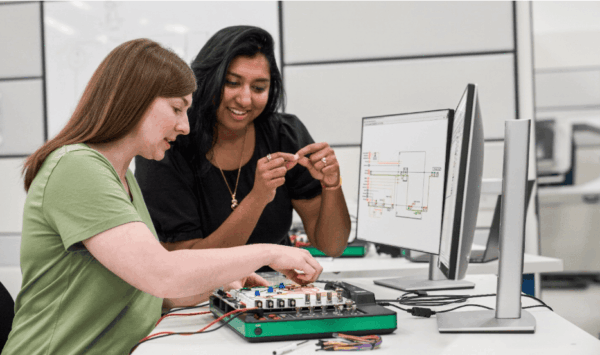
For decades, NI LabVIEW has played an important role in that journey. Graphical programming allows students to see how data moves through a system, making it easier to connect theory with practical implementation. At the same time, AI is changing how engineers learn and develop software. Technologies like Nigel, NI’s AI assistant, are helping students and engineers understand, navigate, and create applications more efficiently.
I believe the future combines both approaches: visual tools that help people understand systems, and AI that helps them move faster. That’s why we continue investing in the integration between Digilent hardware and LabVIEW. Our goal with LabVIEW WaveForms Toolkit 2.0 was simple: make more of the Analog Discovery experience available inside LabVIEW and reduce the barriers between curiosity and discovery.
What’s New in LabVIEW WaveForms Toolkit 2.0
When we planned this release, we listened to professors, students, and engineers already using Analog Discovery devices with LabVIEW. The feedback was consistent: users wanted access to more of their hardware capabilities without having to jump between multiple programming environments.
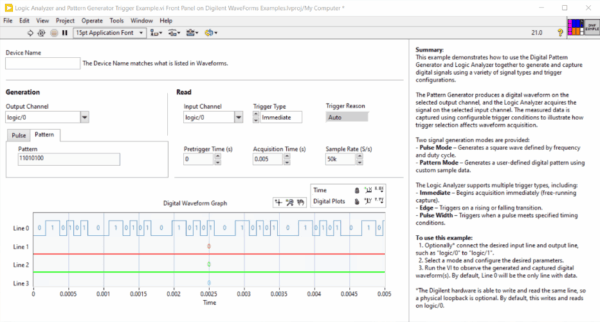
Two of the most requested additions were the Pattern Generator and Logic Analyzer, to allow users to take advantage of more of the digital capabilities already available in their Analog Discovery devices directly from LabVIEW.
We’re also expanding support to macOS, allowing students and educators to combine LabVIEW Community Edition, Digilent hardware, and the WaveForms Toolkit on both Windows and macOS.
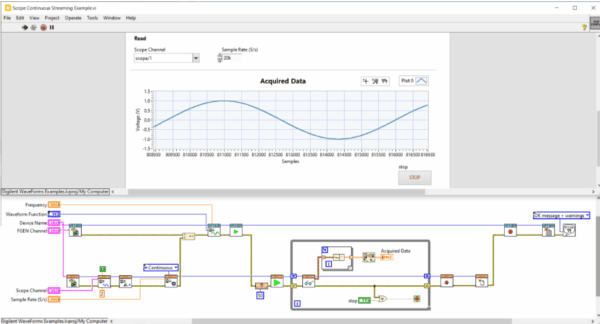
We’re also introducing support for continuous oscilloscope streaming, making it easier to work with longer-running acquisitions and experiments.
Beyond new functionality, we’ve continued improving the overall experience through bug fixes, technical debt reduction, updated examples, and usability improvements. We’re also separating mixed-signal functionality into dedicated instrument experiences, making it easier to work independently with oscilloscopes and logic analysis capabilities rather than treating everything as a single instrument block.
How to Install the Toolkit
Getting started is easy. Download and install the latest Digilent WaveForms software. Then, download the free LabVIEW WaveForms Toolkit 2.0 through VI Package Manager (VIPM), normally installed alongside NI LabVIEW. Once installed, it adds Digilent instrument palettes, APIs, and examples directly into LabVIEW, allowing you to start building applications with supported Analog Discovery devices right away.
To download the toolkit, visit its VIPM package page or search for it on VIPM. Documentation is under the Digilent LabVIEW Reference Manual, and examples are installed under LabVIEW 202x\examples\DigilentWF
Keep Telling Us What You Need
The best ideas rarely start in conference rooms. They start in classrooms, laboratories, and workshops where students and educators are solving real problems.
Many of the improvements in this release came directly from conversations with professors, students, and engineers who told us what was working and what could be better. Please keep sharing that feedback, and keep sharing your projects as well. Seeing what you build helps us make better products.
I’m looking forward to seeing what you create next.


