

Digilent’s WaveForms software includes a small built-in FPGA utility, which is used to configure (program) the FPGA on supported Digilent boards directly from within WaveForms. If you’ve been around for a while, this is essentially the same core technology as what was formerly the standalone Digilent Adept GUI.
What the FPGA Utility Actually Is
WaveForms includes an FPGA configuration/programming tool that uses the Digilent Adept Runtime under the hood. This tool:
- Loads .bit FPGA configuration files to Digilent FPGA boards
- Programs the FPGA over USB using the board’s Digilent USBJTAG interface
- Extends Adept support from Windows-only to also include all standard OSes WaveForms supports
- Provides basic status information (device detected, programming success/failure)
- Requires no AMD tools (Vivado) to be open, or even installed
This is essentially a lightweight version of the Vivado Hardware Manager, integrated into WaveForms, so you can program the FPGA on boards like the Nexys A7, Basys 3, Arty A7, Zybo/Zybo Z7, or others.
What It Does Not Do
The FPGA utility in WaveForms does not:
- Replace Vivado or Vitis
- Synthesize or compile HDL
- Provide debugging tools like ILAs
- Modify the flash memory on an FPGA board
- Expose the FPGA on products that aren’t development boards or program boards not produced by Digilent
It is strictly a programming/configuration tool, not a development environment.
Why It Exists
Digilent used to include this functionality through a standalone Adept application. When this application was deprecated, the functionality was rolled into WaveForms to make sure that users could still access its set of features.
The Adept Runtime (as opposed to the deprecated GUI) is a unified software layer managing USB communication and programming of Digilent products and gets bundled with WaveForms so that the FPGAs on Digilent test and measurement devices like the AD3 can be properly handled by the WaveForms device manager in the background. The FPGA Utility exposes some of the Adept Runtime’s functionality and allows users to quickly program their FPGA boards.
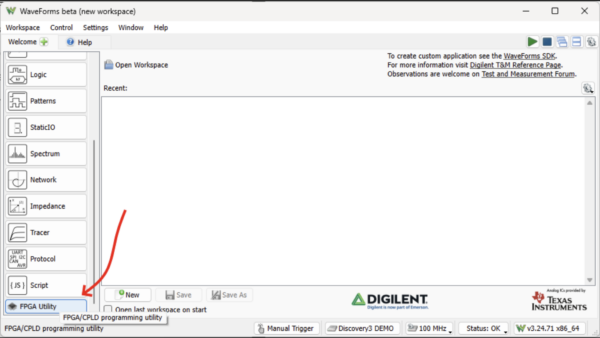
Find the FPGA Utility at the bottom of the instrument list on WaveForms’ welcome screen:
With a board plugged in, it should appear. If it doesn’t, refresh the device list (1):
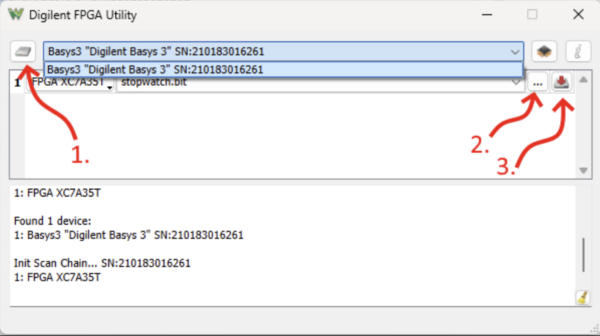
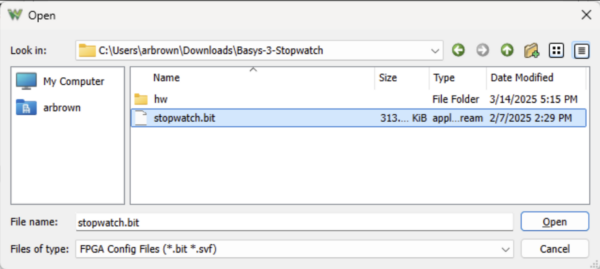
Pick a bitstream via Browse (2, and below), and program the board by clicking the Program button, (3).
That’s all it takes, and a WaveForms download can be up and running on your system from scratch in under five minutes. Find out more about WaveForms and try the FPGA Utility for yourself on its resource center on the Digilent Reference site: WaveForms – Digilent Reference.


