

Digital design education has long relied on simulation to introduce foundational concepts such as Boolean logic, sequential circuits, and finite state machines. While simulation is essential, it does not fully expose students to the realities that define modern digital systems – timing, clocking, I/O behavior, and system integration.
Field‑Programmable Gate Arrays (FPGAs) provide a practical bridge between theory and implementation. By running designs on real hardware, students encounter the constraints and workflows that transform abstract concepts into functional systems. This post outlines a structured, classroom‑ready approach for moving from basic logic to integrated systems using Digilent FPGA platforms, supported by maintained documentation and academic resources.
The Role of Hardware in Digital Design Education
Simulation environments are ideal for learning functional correctness. However, real hardware introduces dimensions that are difficult—or impossible—to replicate virtually:
- Clocking and timing closure
- Safe handling of asynchronous inputs
- I/O standards and pin constraints
- Debugging behavior that depends on physical signals
When students interact with these realities early, they develop stronger intuition and design discipline. FPGA‑based labs make core digital design concepts tangible while reinforcing good engineering practices such as modular design, constraint management, and verification.
Learning Progression: From Foundational Logic to Integrated Systems
A successful hardware‑supported course does not require excessive complexity. Instead, it benefits from a deliberate progression that builds on the same platform and toolchain as concepts mature.
A typical sequence might include:
- Combinational and Sequential Logic
Counters, registers, and simple datapaths observed through LEDs and seven‑segment displays - Finite State Machines and Timing
Human‑scale controllers such as traffic lights or stopwatches that highlight enable generation and timing discipline - Interfaces and I/O
Communication with external systems using UART, basic display output, or peripheral modules - Small Integrated Systems
Multi‑module designs that separate control, datapath, and interface logic
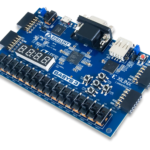
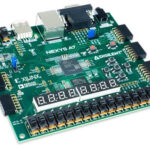
Digilent boards such as Basys 3 and Nexys A7 support this progression without requiring students to change hardware or workflows mid‑course.
Mapping Core Concepts to Hands‑On FPGA Labs
Rather than highly scripted exercises, the following example labs illustrate adaptable patterns instructors can tailor to their curriculum. Each reinforces multiple learning outcomes while remaining approachable for first‑ and second‑year students.
Platform Alignment: Why Digilent Boards Support This Progression
Digilent FPGA boards are designed to support educational workflows from introductory logic through system‑level design:
- Basys 3 provides all essential I/O for early laboratories, minimizing external hardware requirements.
- Nexys A7 adds richer interfaces—such as VGA, audio, and expanded peripheral support—for more complex systems.
- Maintained Reference Centers offer consistent access to reference manuals, schematics, and example designs.
- Vivado toolchain support remains consistent across platforms, reducing friction as students progress.
This alignment allows instructors to focus on teaching design principles rather than managing tooling transitions.
Instructional Outcomes and Observed Benefits
Courses structured around hardware‑based progression commonly report:
- Improved student understanding of timing and synchronization
- Fewer disconnects between simulation and implementation
- Stronger preparation for embedded systems and capstone projects
- Increased student confidence when debugging real systems
These outcomes reflect skills that translate directly to industry and advanced coursework.
Adoption Guidance for Digital Design Courses
For instructors planning or updating a digital design course:
- Begin with Basys 3 for foundational logic, FSMs, and timing concepts
- Introduce communication or display interfaces to reinforce system thinking
- Transition to Nexys A7 where richer I/O or integrated systems are required
- Leverage Digilent Reference Centers to standardize labs and reduce preparation time
This approach provides continuity across courses while remaining flexible to departmental needs.
Building Scalable Digital Design Coursework
Digilent FPGA platforms are designed to support digital design education from introductory logic through system‑level coursework, with maintained documentation and consistent toolchain support.
Faculty can explore available boards, reference centers, and academic resources at:
https://digilent.com/shop/products/fpga-boards/
Example Labs:
Seven‑Segment Display Driver (Basys 3)
This lab introduces time‑multiplexing, clock enables, and clean module interfaces using the Basys 3. Students implement a driver that controls the on‑board seven‑segment display, reinforcing counters and basic control logic while gaining early experience with pin constraints.
The immediate visual feedback makes this exercise effective for reinforcing timing concepts, and the lab scales easily to extensions such as hexadecimal displays or scrolling patterns.
Resources: Tutorial, Basys 3 Reference Manual
FSM‑Based Controller with Debounced Inputs (Basys 3)
In this lab, students design a finite state machine that responds to button or switch inputs. A debouncing and synchronization stage is required to ensure reliable behavior, exposing students to real‑world input challenges.
Common applications include traffic light controllers or simple control panels. The exercise strengthens students’ ability to translate state diagrams into robust hardware implementations.
Resources: FPGA Lab, Basys 3 Reference Manual
UART Communication Interface (Basys 3 or Nexys A7)
A UART lab introduces serial communication and basic protocol handling. Students build a transmit and receive path and interact with their design through a PC terminal, creating a strong connection between hardware and external software tools.
This lab often serves as a transition point toward embedded systems, as students begin to think in terms of registers, status reporting, and command interfaces.
Resources: UART Project on GitHub, Basys 3 Reference Manual, Nexys A7 Reference Manual
VGA Timing and Pixel Generation (Nexys A7)
Using Nexys A7, students generate video timing signals and create simple visual output. This lab emphasizes timing accuracy, synchronization, and structured pixel pipelines.
Video output is highly engaging and reinforces the importance of correct constraints and deterministic timing, while remaining accessible at an undergraduate level.
Key resources: VGA Design on GitHub, Nexys A7 Reference Manual


