null

Basys 3 AMD Artix™ 7 FPGA Trainer Board: Recommended for Introductory Users

$165.00

Add a free USB A to Micro-B cable with your FPGA purchase!

(17 reviews) Write a Review
SKU:
410-183
UPC:
0799430212373
Adding to cart… The item has been added

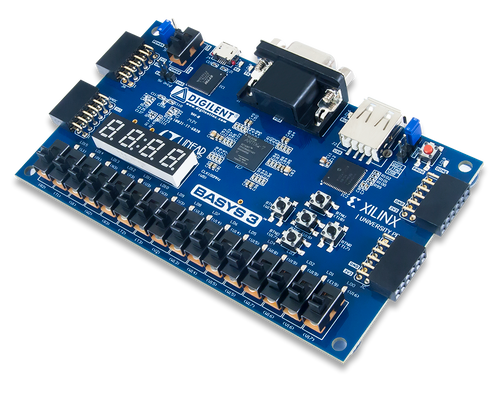
The Basys 3 is one of the best boards on the market for getting started with FPGA. It is an entry-level development board built around an AMD Artix™ 7 FPGA.

As a complete and ready-to use digital circuit development platform, it includes enough switches, LEDs, and other I/O devices to allow a large number of designs to be completed without the need for any additional hardware. There are also enough uncommitted FPGA I/O pins to allow designs to be expanded using Digilent Pmods or other custom boards and circuits, and all of this at a student-friendly price point.

The Basys 3 is designed exclusively for the AMD Vivado™ Vivado Design Suite, and the Standard edition is available as a free download from AMD.

Guides and demos are available to help users get started quickly with the Basys 3. These can be found through the Support Materials tab.

To view our EMC Disclaimer, click here.

  • Features the AMD Artix™ 7 FPGA: XC7A35T-1CPG236C
  • 33,280 logic cells in 5200 slices (each slice contains four 6-input LUTs and 8 flip-flops) 
  • 1,800 Kbits of fast block RAM 
  • Five clock management tiles, each with a phase-locked loop (PLL)
  • 90 DSP slices
  • Internal clock speeds exceeding 450 MHz
  • On-chip analog-to-digital converter (XADC)
  • Digilent USB-JTAG port for FPGA programming and communication
  • Serial Flash 
  • USB-UART Bridge 
  • 12-bit VGA output 
  • USB HID Host for mice, keyboards and memory sticks 
  • 16 user switches 
  • 16 user LEDs
  • 5 user pushbuttons 
  • 4-digit 7-segment display
  • 4 Pmod ports: 3 Standard 12-pin Pmod ports, 1 dual purpose XADC signal / standard Pmod port
  • Micro-B USB cable not included, but can be added for free with your Basys 3!
  • Basys 3 FPGA development board
    • Receive a free USB A to Micro-B cable with your Basys 3 purchase! (Must have the USB cable and Basys 3 in your cart for the discount). 
  • Custom Digilent cardboard box with protective foam

To create and modify designs for your Basys 3, you can use the AMD Vivado™ Design Suite. Vivado is a software designed for the synthesis and analysis of HDL designs. The Basys 3 is supported by the free Standard edition of the AMD Vivado™ Design Suite.

Note: AMD software tools are not available for download in some countries. Prior to purchasing the Basys 3, please check the supporting software's availability, as it is required for the board's use.

Quickly find what you need to get started and reduce mean time to blink.

All product support including documentation, projects, and the Digilent Forum can be accessed through the product resource center.

Resource Center

Quick Links

Reference Manual
Schematic

Videos Hide Videos Show Videos

17 Reviews Hide Reviews Show Reviews

  • 4
    u asked me for a review

    Posted by Digilent Customer on 22nd May 2018

    just wanted you to know that it was unclear if the USB A or B cable was what I needed. But power is supplied by the USB B connection and that was it. It also took a long time before I plugged it in .. hard to tell w/o a magnifying glass to tell .. picture is not clear

  • 5
    Excellent board for Universities aswell

    Posted by Margus Rosin (Estonia) on 18th Mar 2018

    I have been using Nexys2, Basys, Basys2 and now also Basys3 is out. Basys3 is much powerful then Basys2 but has the same small shape. Awesome. If something to improve then until Basys3 there was and easy to use for students box. Basys3 is on a paper box that students are able fast to destroy.

  • 5
    Great board and excellent training material

    Posted by John on 19th Oct 2017

    This is a great board to begin exploring FPGAs. The combination of training materials from Digilent and Xilinx make it easy to get started. There are examples using Xilinx Vivado so you can get something started right away. Both youtube videos and documents, making it possible to self-teach.

  • 5
    Great beginner FPGA Board

    Posted by Whitney Sennett III on 3rd Oct 2017

    This is an excellent beginner fpga board. I needed it for a college course but find myself using it for personal projects now. Academic pricing makes it quite affordable. It doesnt come with a cable ,but micro usb is everywhere and easy to get. Looking to get a few pmods to expand my learning.

  • 5
    The best FPGA board for beginners

    Posted by Van Loi Le on 5th Sep 2017

    I used this board to do few projects for my students. It's perfectly designed for students and super easy to use. Digilent also provides many other peripherals for other communications. Thus, I just bought the board for my website also ( fpga4student.com ). I am going to use the board for many upcoming FPGA projects on my website.

  • 4
    Excellent board, poor packaging and no USB

    Posted by Jim Lewis on 27th Jun 2017

    SynthWorks' uses Digilent Basys boards in our VHDL training classes. From a features stand point, the Basys2 and 3 are great boards (and so was Pegasus). As we transition from Basys 2 to 3, I am missing the nice sturdy plastic box that the Basys 2 had. If you want to cost reduce, why not just the ESD bag that Pegasus had rather than the cheezy plastic box. We learned with Basys 2 that an FPGA board lasts longer than the USB connector of the day. Basys 2 came with the appropriate USB connector, Basys 3 does not - this is unfortunate.

  • 5
    Excellent

    Posted by Fernando Becerra on 5th Aug 2016

    Excellent board, great way to introduce yourself to FPGA, would like more I/O but for the education price it's all right.

  • 5
    Excellent Value for Money

    Posted by David Fergenson on 14th Jan 2016

    If you want the most powerful board under the sun, this is NOT the board for you. But if you want a good place to start learning or a cost effective component in a larger design, you won't find a better product on the market. And there's a clear upgrade path with Digilent if you run out of fabric on the FPGA. There are enough user inputs and outputs on the board to let you verify a moderately complex design. Once you've gotten your development done, there are enough inputs and outputs on the PMODs to let you interface the board with the real world. The XADC ports are on their own dedicated PMOD so if you need to introduce analog signal directly into your design, you can do so without needing anything external. The flexible power supply--USB or external--combined with the ability to store a default bitstream on-board means that you can develop a headless system using nothing but this board. The Basys3 is fairly well documented and, with additional information in the form of the user forums and YouTube videos available, you won't have a problem getting your job done.